Home Office Lighting Ideas for Video Calls: Professional Setup Tips
In today’s remote work environment, looking professional on video calls has become just as important as dressing for the office. Poor lighting can make you appear tired, washed out, or difficult to see, affecting how colleagues and clients perceive you. The good news is that achieving flattering, professional lighting doesn’t require expensive equipment or a complete office overhaul.
With strategic placement and affordable solutions, you can transform your video call appearance dramatically. These home office lighting ideas for video calls will help you create a polished, camera-ready workspace that boosts your confidence and professional presence during every virtual meeting.
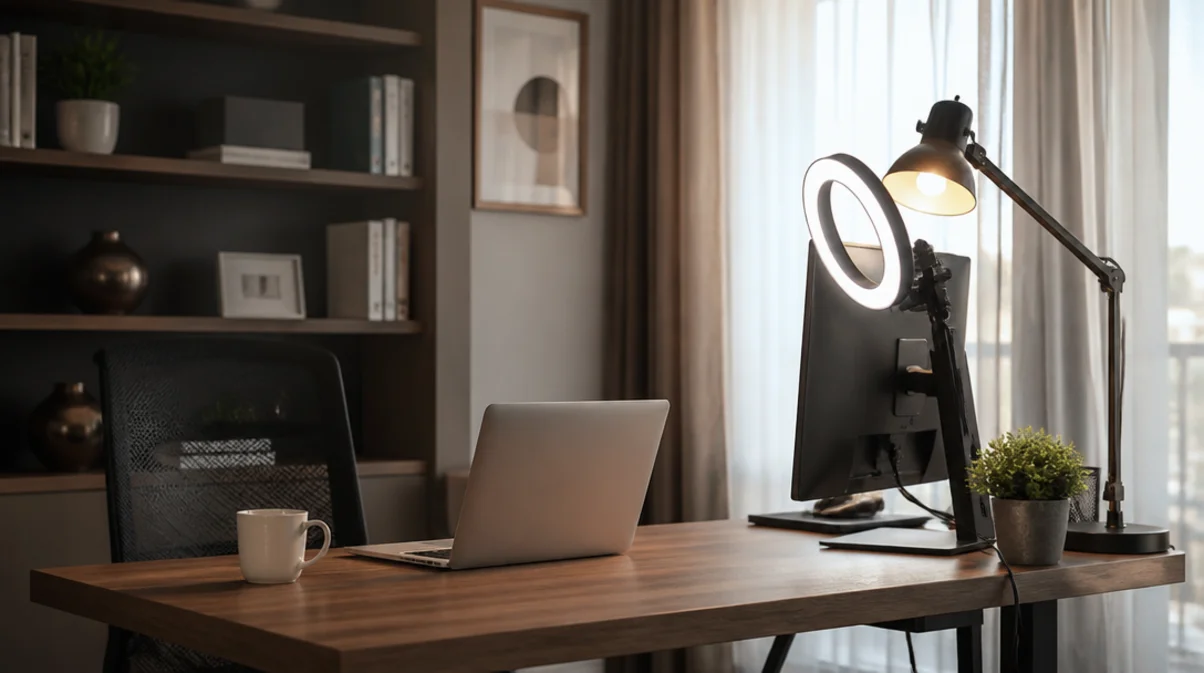
Understanding the Three-Point Lighting Principle
The secret behind professional video lighting comes from cinematography: three-point lighting. This technique uses a key light (your main light source), fill light (to soften shadows), and back light (to separate you from the background). For home office lighting ideas for video calls, you don’t need professional film equipment to apply this principle.
Your key light should be positioned at a 45-degree angle from your face, slightly above eye level. A simple desk lamp with a daylight bulb or an affordable ring light works perfectly. The fill light can be as simple as a white poster board reflecting light back onto your face, eliminating harsh shadows. Natural window light makes an excellent key light if positioned correctly. Better Homes & Gardens offers comprehensive lighting basics that apply beautifully to video setups.
Positioning Your Desk for Natural Light Success
Natural light remains the most flattering and cost-effective lighting solution for video calls when used correctly. Position your desk perpendicular to windows rather than facing them or having them behind you. This side-lighting creates dimension while avoiding the silhouette effect of backlighting or the squinting discomfort of front-facing windows.
If your window faces your desk, sheer curtains diffuse harsh sunlight beautifully, creating soft, even illumination. Morning north-facing windows provide the most consistent natural light throughout the day. Consider your meeting schedule when arranging furniture—if most calls happen midday, ensure your setup accommodates bright afternoon sun. For inspiration on optimizing desk placement, check out small home office desk ideas that maximize natural lighting advantages while maintaining functionality.

Affordable Ring Light and Lamp Solutions
Ring lights have become synonymous with video calls, and for good reason—they provide even, shadowless illumination that flatters every face. Budget-friendly options starting around twenty dollars offer adjustable brightness and color temperature, mounted conveniently on your desk or monitor. Position your ring light directly behind your webcam at eye level for the most flattering effect.
Alternatively, LED desk lamps with adjustable arms give you flexibility to experiment with angles. Look for lamps rated at 5000K-6500K (daylight spectrum) to appear natural and alert on camera. Clip-on book lights work surprisingly well as fill lights when bounced off nearby walls. Avoid overhead lighting alone, which creates unflattering shadows under eyes and nose. The investment in proper lighting pays dividends in how professional and engaged you appear during virtual meetings.
Color Temperature and Bulb Selection for Video Calls
Color temperature dramatically affects how you appear on camera, yet many overlook this crucial detail when implementing home office lighting ideas for video calls. Warm bulbs (2700K-3000K) create cozy atmospheres but can make you look yellowish or tired on camera. Cool daylight bulbs (5000K-6500K) most closely mimic natural light, making you appear alert and energetic.
Mixed color temperatures create unflattering color casts—ensure all your lighting uses similar temperature bulbs. LED bulbs offer energy efficiency and don’t generate heat like traditional incandescent options, keeping you comfortable during long video sessions. Dimmable bulbs provide flexibility for different times of day and natural light conditions. Smart bulbs allow quick adjustments between calls without leaving your chair. HGTV’s guide to light bulb types explains color temperature in detail for better decision-making.
Background Lighting Creates Professional Depth
While focusing on face lighting, don’t neglect your background—proper background illumination separates you from the wall, creating professional depth that elevates your entire video presence. A small lamp or LED strip light placed behind you adds dimension without being visible in frame. This backlighting technique prevents you from appearing flat or blending into your surroundings.
Position background lights to illuminate bookcases, plants, or artwork that add visual interest to your video calls. Avoid backlighting that’s too bright, which creates an unwanted halo effect. Soft, warm-toned background lighting creates inviting ambiance while maintaining professional appearance. If working with limited space, consider corner desk ideas for small spaces that incorporate clever background lighting solutions without overwhelming your workspace.

Avoiding Common Video Lighting Mistakes
Even with good intentions, many remote workers make lighting mistakes that sabotage their video call appearance. Sitting with windows behind you creates silhouetting, making you appear as a dark figure against bright light. Overhead lighting alone casts unflattering shadows under eyes, nose, and chin. Using only laptop screen light creates an eerie, unflattering glow from below.
Mixing natural and artificial light without matching color temperatures creates strange color casts. Positioning lights too close causes harsh shadows and overexposure. Instead, start with your key light source, add fill lighting gradually, and test your appearance before important calls.
Take a screenshot during a test call to evaluate your lighting objectively. Adjust positioning and intensity until you achieve even, natural-looking illumination. Remember that proper lighting should make you look well-rested and professional without appearing artificially lit.
Practical Tips for Different Room Configurations
Not every home office offers ideal lighting conditions, but creative solutions exist for challenging spaces. Basement offices without windows benefit from multiple light sources mimicking natural light—combine daylight-spectrum overhead lighting with desk lamps at various angles.
Rooms with limited space require compact solutions like adjustable arm lamps that swing out of the way when not needed. Open-concept spaces with varying natural light throughout the day need adjustable lighting solutions you can quickly modify.
Small bedrooms converted to offices can use vertical space with wall-mounted swing-arm lamps. Shared spaces require portable lighting solutions that set up and pack away easily. Battery-operated LED lights offer flexibility without extension cord clutter. Whatever your space limitations, prioritizing face lighting first, then addressing background illumination second, ensures you maximize your budget and available options effectively.
Conclusion: Illuminate Your Professional Presence
Implementing these home office lighting ideas for video calls transforms not just your appearance but your confidence during virtual meetings. Quality lighting demonstrates professionalism and attention to detail that colleagues and clients notice, even if they can’t articulate why you look more polished than others. Start with one good key light source positioned correctly, then build your setup gradually as budget allows.
Natural light remains your best friend when positioned properly, supplemented strategically with affordable artificial lighting. Remember that even small improvements make significant differences in how you present yourself professionally. Test different configurations, take screenshots, and adjust until you find your perfect setup. Your video call presence deserves the same attention you’d give your in-person appearance.
Ready to upgrade your workspace?
Explore more budget-friendly home office ideas to create your ideal remote work environment today. Start with lighting, and watch your professional presence shine.


One Comment